Claude, Anthropic's AI assistant, can now read your bank accounts and tell you where your money goes. The feature is called Personal Finance, and you can't use it in Switzerland: it only works with US banks, and only on a paid plan.
Spentio gives you that picture today, with your Swiss bank and the one you still have back home. Upload your statement, as a PDF or a photo from your banking app, and a minute later your spending is sorted. Free, and it never asks for your e-banking login.


What is Claude Personal Finance?
Personal Finance is the money feature in Claude, launched by Anthropic as a beta on November 5, 2026. You connect your accounts through Plaid, an outside service that links apps to banks, and Claude answers your questions about your spending. According to Anthropic's help page:
- US banks only. Outside the US, the feature doesn't even appear.
- Paid plans only. Pro, Max and Ultra. The cheapest, Pro, costs 20 dollars a month.
- Up to 24 months of transactions.
- Investments as a balance only. No holdings, no trades.
ChatGPT has a similar feature, Finances, also US-only and also through Plaid.
Spentio and Claude Personal Finance compared
| Spentio | Claude Personal Finance | |
|---|---|---|
| Works in Switzerland | ✅ Any bank in the world | ❌ US banks only |
| Signing in to your bank | ✅ Never | ❌ Required, through Plaid |
| Free plan | ✅ Reads your statements in full | ❌ Paid plans only |
| History | ✅ Every year your statements cover | ❌ Up to 24 months |
| What you share | ✅ Only the statement you upload | ❌ Every transaction in your linked accounts |
| If you stop paying | ✅ Nothing to disconnect | ❌ Anthropic keeps access to your bank |
| Dashboard and budgets | ✅ Stay, no connection involved | ❌ Gone when you unlink your last bank |
| Investments | ✅ Holdings, gains and dividends | ❌ Balance only |
| Apple Pay | ✅ Logged the moment you pay | ❌ Only what the bank reports |
Spentio: upload your statement, done
Upload your statement, as a PDF or a photo from your banking app. A minute later every transaction is categorized and your subscriptions are found. You approve what it found, and your month is done.
It works with any bank in the world, from PostFinance to your cantonal bank: 42 Swiss banks are in the catalogue. Upload last year's statements, or five years of them, and your whole history is there on day one.
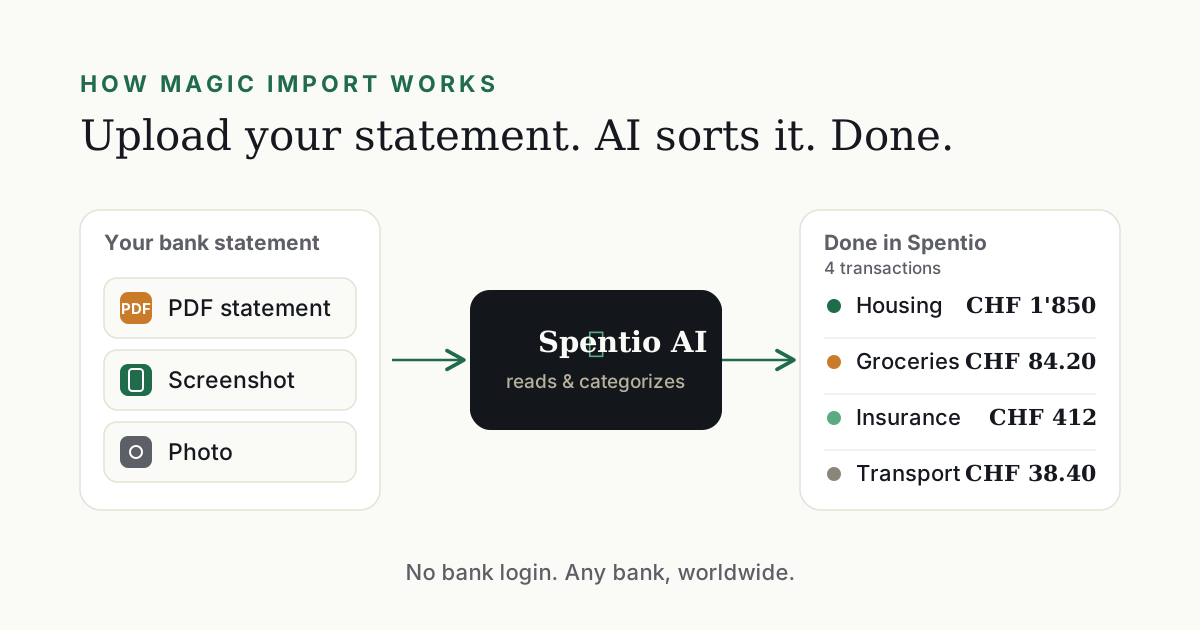
Spentio updates when you decide: one statement a month, and that's it. In between, there's no connection to look after.
What you get with Spentio
Your e-banking login stays yours
You never sign in to your bank for Spentio, directly or through another service. Download the statement from e-banking as usual, then upload it.
Who else has access to your bank?
With Claude Personal Finance, two companies that aren't your bank do: Plaid and Anthropic. Once you link your accounts through Plaid, Claude can look at them at any moment, without asking you each time. And that access doesn't expire: even if you cancel your subscription, Anthropic keeps it until you revoke it.
With Spentio, nobody does. There's no connection to your bank, and what you share is always your call.
Free to start, no card needed
The free plan reads your statements in full, and signing up doesn't ask for a credit card. If you've been keeping a spreadsheet, or typing everything into a manual budget app, that work stops with your first statement.
Francs, euros and the account back home
Each account keeps its own currency, and everything adds up in yours, at the rate of the day. Salary in francs, savings in euros, an old account from home: one view of all of it.
All your history, not just two years
How far back you go is up to your statements, not a connection. For each bank, Spentio shows which months you haven't added yet.
Logged as you pay
Pay with Apple Pay on your iPhone and the expense lands in Spentio with the amount, the shop and the category already filled in. Paid cash? Add it in seconds.
A heads-up before it matters
Spentio pings your phone the day before a recurring bill is due, when your spending pace would push you over a budget, and early in the month if a statement is missing. On iPhone, widgets keep this week's bills and your budgets on your home screen.
Your portfolio, next to your spending
Stocks, ETFs and the major coins, valued in your own currency. Upload your broker's statement and Spentio picks up the purchases, sales and dividends, so you see what each holding has made and whether you've beaten the market.
Budgets that keep up with you
Each budget shows, day by day, whether the money will last the month. Control checks your budgets against what you really spend and flags what's off: a cap that's too low, one that's too high, an expense that comes back so regularly it should be a recurring payment.
Look ten years ahead
Forecast lays out your bills, budgets and goals month by month, up to ten years out, and shows what's left. Drop a payment or raise a budget and you see the result before you commit.
And plenty more
- TWINT from friends: only your share of dinner counts.
- Lunch-Check, Reka and other benefit cards: each with its own balance.
- Installments: split a purchase and see every payment coming.
- Objects: what the car, the flat or the dog really costs you, in one number.
- Money Mix: how much of your month was necessary, how much was your choice and how much just happened.
- Goals: what you put aside for a goal is counted automatically.
- Recurring: salary, rent and subscriptions appear on the right day by themselves.
Privacy: you decide what's shared
Connecting your bank hands over a master key. And with Claude Personal Finance, what Claude said about your money stays in your chats until you delete it.
With Spentio there's no key. The PDF is deleted the moment its text is read, and your statements are never used to train AI models. Spentio is built in Switzerland, and what you save in it is stored in Switzerland, under Swiss and EU data protection law. Export all your transactions as CSV whenever you like, and delete your Spentio account, with everything in it, in one step. The details are in the privacy policy.
Bottom line
Claude Personal Finance asks for a US bank, a paid plan and a link to your accounts. Spentio asks for your last statement: any bank, a free plan, years of history and no login. Start free.