Most budget apps for Switzerland share the same problem: you type every expense by hand. The coffee, the Migros run, the health insurance bill, every payment entered yourself. After three weeks, almost everyone gives up.
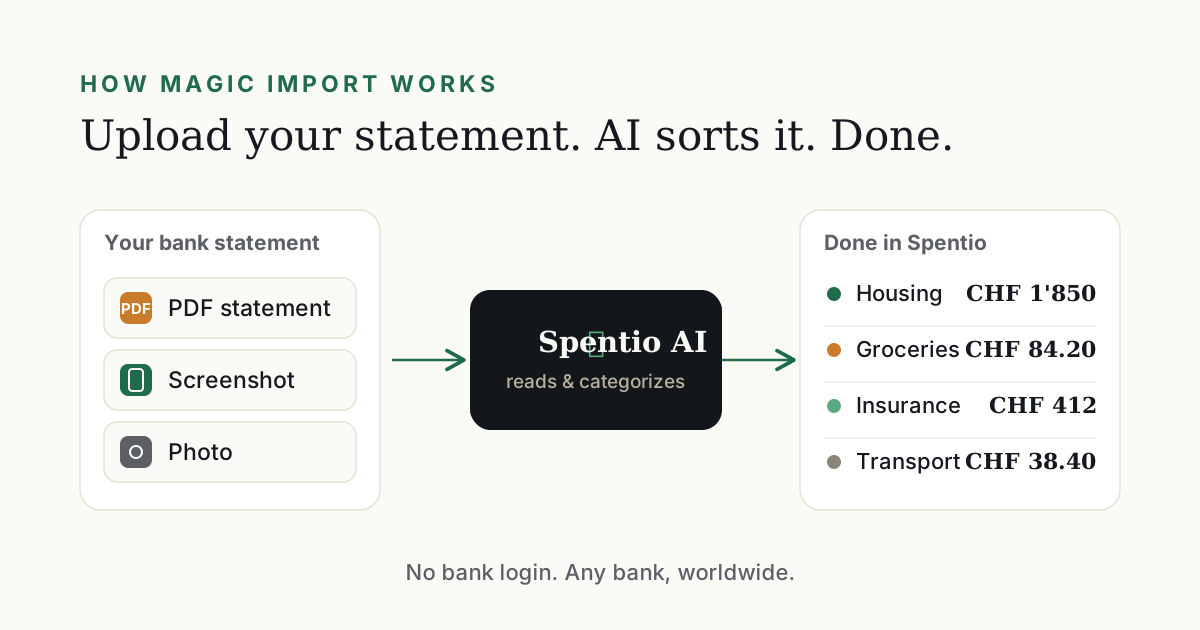
Spentio goes the other way. You upload your bank statement, the AI reads it and categorizes everything automatically. No bank login, no typing. It works with statements from Swiss banks like Migros Bank, Raiffeisen, PostFinance, Yuh, and Neon, and just as well with the bank you still have back home. Here is how it compares with the best-known expense trackers.


Spentio: upload your statement, done
Instead of connecting to your bank, Spentio's AI reads your statement, whether it's a PDF or a photo from your banking app. It works with any bank worldwide, and you never hand over your credentials. Categories, subscriptions, and budgets are detected automatically. Your data lives on Swiss servers under Swiss and EU privacy law. Francs and other currencies are understood from day one. The free plan reads your statements in full.
Pay with Apple Pay on your iPhone and the expense is already in Spentio, the moment you pay. Here's how automatic logging works.
What Spentio does that the others don't
All of the following apps are manual trackers: every entry is typed by hand. None of them reads a statement, none categorizes your expenses with AI.
| App | Statement import (PDF/photo) | AI categorization | All banks in one view | Detects subscriptions | Logs Apple Pay the moment you pay |
|---|---|---|---|---|---|
| Spentio | ✅ | ✅ | ✅ | ✅ | ✅ |
| Fleur | ❌ | ❌ | ❌ | ❌ | ❌ |
| Money Manager | ❌ | ❌ | ❌ | ❌ | ❌ |
| MoneyControl | ❌ | ❌ | ❌ | ❌ | ❌ |
| Today's Budget | ❌ | ❌ | ❌ | ❌ | ❌ |
The manual alternatives at a glance
Fleur: A beautifully designed app for iPhone, iPad and Android. But everything is manual, and there's no bank connection. Elegant typing is still typing.
Money Manager: A popular tracker full of charts. But every entry goes in by hand.
MoneyControl: Solid and simple. The free version stops at 20 entries a month, after that you pay.
Today's Budget: Deliberately skips any bank connection. Clean design, but with no import you type every amount yourself.
The pattern is always the same: nice interfaces for a job Spentio takes off your hands completely.
Privacy: the underrated advantage
Apps with a bank login hold a permanent master key to your account. Spentio doesn't. You decide which statement to upload, and there's never a direct connection to your bank.
Bottom line
Manual expense tracking dies on discipline. Spentio does the work for you: statement in, everything sorted. Hosted in Switzerland, compliant with Swiss privacy law. Start free.